Symptom: Authentication dialog keeps reappearing when you click .
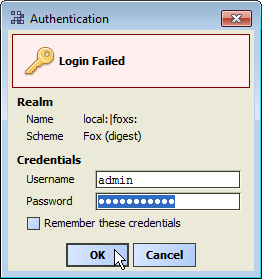
Likely cause: Username and password do not match the station’s stored credentials for the admin user.
-
Username:
admin -
Password:
type the password entered in the last “Reset Password” popup dialog for user admin, or else the password changed for the admin
                           user from another station view, such as the User Manager.
To fix: Re-enter login credentials last used to access the station as user admin.
 If the demo station’s admin account password has never been changed, you can leave the Password field blank (empty). This
produces the “Reset Password” dialog to change this password. See Step 8 in Get the Demo Up and Running.In some cases where the demo station has been previously accessed and configured, the well-known admin user may have been
deliberately disabled, and some other “super user” created or enabled in place. In this scenario, login using the credentials (Username and Password)
for that user instead.See Demo stations security notes.
If the demo station’s admin account password has never been changed, you can leave the Password field blank (empty). This
produces the “Reset Password” dialog to change this password. See Step 8 in Get the Demo Up and Running.In some cases where the demo station has been previously accessed and configured, the well-known admin user may have been
deliberately disabled, and some other “super user” created or enabled in place. In this scenario, login using the credentials (Username and Password)
for that user instead.See Demo stations security notes.